Jekyll2022-03-04T12:53:44+01:00https://ziegemeyer.com/feed.xmlZIEGEMEYER ConsultingRegulation | Risk management | ReportingDirk ZiegemeyerThe AnaCredit History Reader: Establishing Data Transparency2020-05-30T00:00:00+02:002020-05-30T00:00:00+02:00https://ziegemeyer.com/products/anacredit-history-readerZiegemeyer Consulting’s AnaCredit History Reader is a software tool that enables banks to read historical AnaCredit reports and gain rapid transparency regarding data held by the Deutsche Bundesbank.
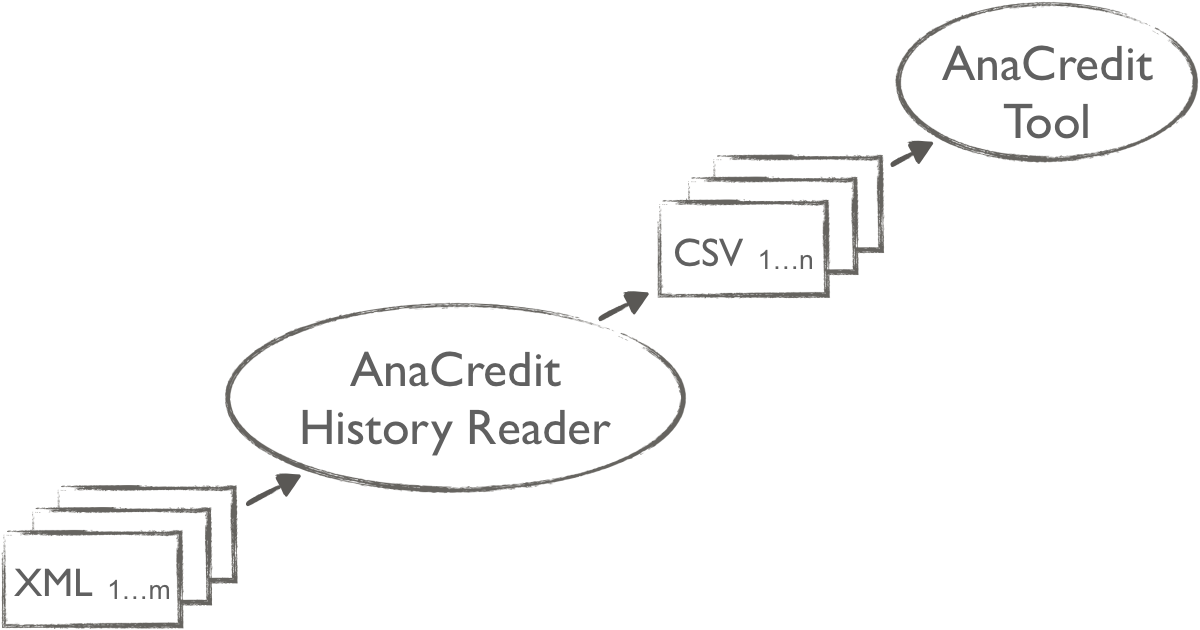
The software takes the XML files submitted to Deutsche Bundesbank and generates easy-to-read CSV tables with the active datasets. Its output is used by the AnaCredit Tool to generate deletion and correction reports and for cross-repdate validations.
AnaCredit reporting is cumulative
AnaCredit reports build up a history in the Bundesbank and ECB (European Central Bank) databases. Every new report is based on this history. Knowledge of this history is needed for the following reasons:
To report an instrument with action attribute Delete, either:
because it was reported by mistake, or
because it is no longer subject to reporting
To check validation rules referring to previous reporting dates
To identify changes in counterparty reference and loan data
Deutsche Bundesbank defines the main rules with regard to the historical AnaCredit database as follows:
The start date for building the historical database is the reporting date of September 2018 – see Circular 63/2018.
Static loan data are valid without time limit until they are explicitly terminated using the action attribute Delete.
Static loan data already reported as terminated are reinstated for an unlimited time where corrected for a previous reporting date. A separate new deletion report needs to be filed once the correction has been reported.
To determine the volume of static loan data with unlimited validity, the chronological order of the filed reports must be known. Bundesbank requirements regarding deletions and corrections are explained in detail in Circulars 76/2018 and 27/2019.
How it works
The AnaCredit History Reader requires the following input data:
List of all XML files sent to and accepted by the Bundesbank, in chronological order. This list covers reports by the reporting agent and all of its observed agents and all reports since September 2018.
Reporting date for which the active data records are to be created
All submitted and accepted XML files.
The software generates one CSV file for each AnaCredit SDMX dataset per reporting agent and each of its observed agents. It maps the Deutsche Bundesbank technical specification with respect to action attributes Replace and Delete, together with the various rules that apply to static loan data and dynamic loan data.
Use cases for the AnaCredit History Reader
The AnaCredit History Reader is a stand-alone application whose output can be used for the following purposes:
Deleting loan data in AnaCredit reports
Performing cross-repdate validations
Identifying changes in counterparty and loan data
Displaying active records for any reporting date
Reading AnaCredit legacy data for migration to new AnaCredit reporting software
Try it out on a no-obligation basis
See for yourself. Request a non-binding test version of the AnaCredit History Reader by e-mail.
]]>Dirk ZiegemeyerThe AnaCredit Tool: lightning-fast report creation2020-03-29T00:00:00+01:002020-03-29T00:00:00+01:00https://ziegemeyer.com/products/anacredit-toolThe AnaCredit Tool provides to credit institutions a highly effective process for preparing reports to the Deutsche Bundesbank.
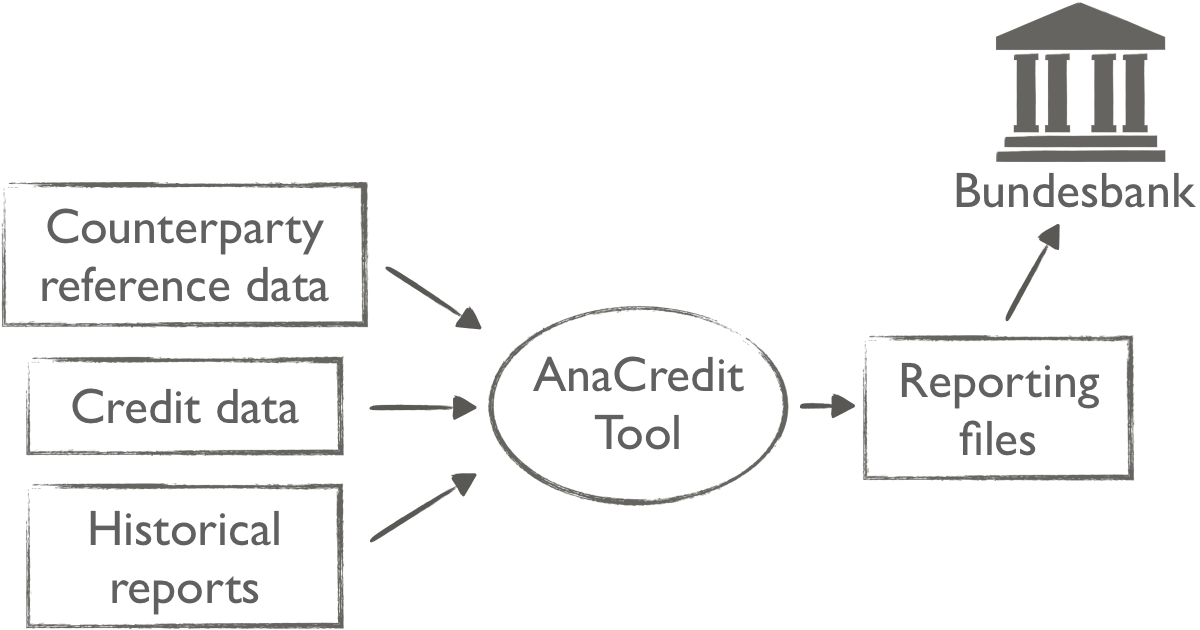
Only the counterparty reference data, the credit data and the historical AnaCredit reports are required for this. The data field descriptions correspond almost completely to the technical specification of the Bundesbank and are therefore excellently documented.
The AnaCredit Tool uses the delivered business portfolio to determine the counterparty reference data and credit data subject to reporting. These are then compared with the data already historically reported to the Bundesbank. The tool automatically generates deletion reports due to expired transactions or transactions requiring correction.
The validated and submittable reporting files are created within few seconds to minutes – depending on the size of the business portfolio. A clear evaluation of the main key figures and validation results allows an initial check at a glance and a comparison with the previous month.
Detailed processing logs show incorrectly delivered data and violated validation rules. After correction of the input data, processing is simply repeated.
Advantages of the AnaCredit Tool
Installation and customizing in only five minutes
Lightning-fast creation of submittable reporting files
Comprehensible: all loans not subject to reporting requirements are recorded with grounds
Specialized validation according to the specifications of the Bundesbank
Technical validation against the XSD schema
Clear presentation of the key figures
Simple tabular input format (Excel/csv)
Data field description based on the technical specification of the Bundesbank
“Privacy by design”:
Local data processing – completely without cloud
Data economy – core without data storage
Resource-efficient:
No database required (saves license fees, installation and maintenance costs)
No server required
No cloud required
Runs on standard office PCs on Windows and Mac OS X
Future-proof:
Regular implementation of new regulatory requirements
Very high quality, stability and very good maintainability of the software through a state-of-the-art development process
Platform-independent: runs on Windows and Mac OS X (Linux, Java and Docker Containers are available on request)
About the AnaCredit report
The subject of the AnaCredit report is granular credit and credit risk data. Credit institutions resident in Germany and branches of foreign credit institutions are required to report to the Deutsche Bundesbank.
Instruments are reported if the loan amount reaches at least 25,000 euros. Loans to natural persons are not subject to reporting.
The report is due monthly and must be submitted by the 6th business day after the end of the month.
Test without obligation
See for yourself. Request a non-binding test version of the AnaCredit Tool by e-mail.
]]>Dirk ZiegemeyerThe Million Euro Loan Tool: reporting under section 14 of the German Banking Act (KWG)2019-03-02T00:00:00+01:002019-03-02T00:00:00+01:00https://ziegemeyer.com/products/kwg-million-euro-loan-toolThe software allows banks and other financial service providers to generate the reporting files for loans of €1.0 million or more required under section 14 of the German Banking Act (KWG).
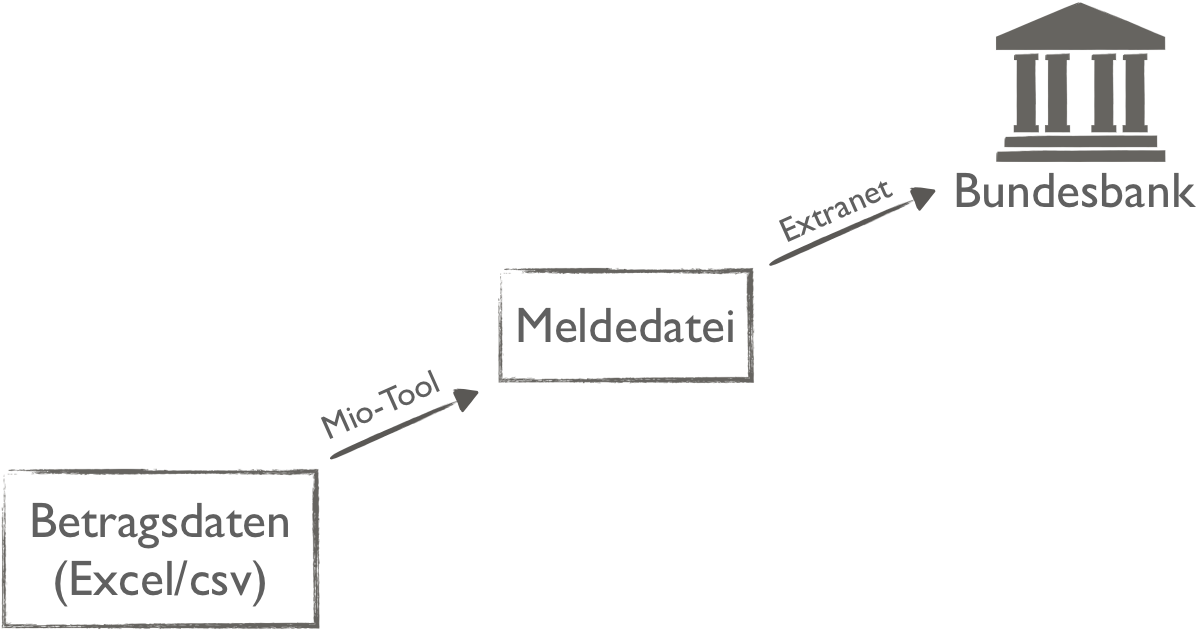
The Million Euro Loan tool takes the report tables (BA/BA6/BA7), reads and validates them and converts the result to a report file formatted as xml which can be uploaded to the Extranet of Deutsche Bundesbank.
Advantages of the KWG Million Euro Loan Tool
Installation and customizing in only five minutes
Privacy by design:
Local data processing – completely without cloud
Data economy – core without data storage
Simple tabular input format (Excel/csv)
Validation according to the specifications of the Deutsche Bundesbank
Technical validation against the XSD schema
Future-proof:
Regular implementation of new regulatory requirements
Platform-independent: runs on Windows and Mac OS X (Linux, Java and Docker Containers are available on request)
About the KWG €1.0 Million Loan reporting
Loans of €1.0 million or more have to be reported to Deutsche Bundesbank. The following entities are required to submit reports according to section 14 of the German Banking Act (KWG):
Credit institutions
CRR investment firms
Own-account dealers
Factoring companies
Financial services institutions with factoring / financial leasing
Social security funds
Insurance undertakings
Risk capital investment companies
New requirements as from 2019
Regulations change at the beginning of the year 2019. The following additional fields have to be reported as from reporting reference date 2019-03:
POS111 Debt securities (POS112: of which in the trading book)
POS113 Shares/Equity (POS113: of which in the trading book)
POS115 Reverse repo / Securities lending as borrower
POS116 Repo / Securities lending as lender
POS122 Irrevocable undrawn credit facilities
POS123 Revocable undrawn credit facilities
POS131 Counterparty risk from credit derivatives as protection receiver
POS132 Counterparty risk from credit derivatives as protection provider
The One Million Euro Loan Tool covers all new requirements.
Test without obligation
See for yourself. Please contact me to request a non-binding test version of the One Million Euro Loan Tool.
]]>Dirk ZiegemeyerSolution to compare two EBA bank supervisory reports2015-04-10T00:00:00+02:002015-04-10T00:00:00+02:00https://ziegemeyer.com/articles/compare-eba-bank-supervisory-reportsIf you ever opened a european bank supervisory report represented as an XBRL
file with a text editor in order to compare it with another data
record during regression testing, you know the problem: XBRL format no
longer contain table cells, because the data points are described by
their dimensions which may be considerably complex.
It is not possible to compare two XBRL files directly.
With an intermediate step, the comparision of two reports succeeds:
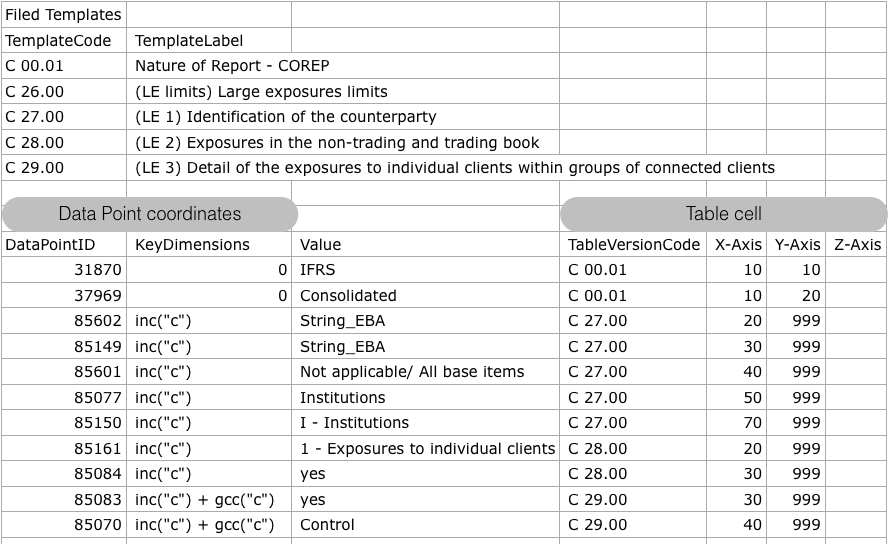
The XBRL file is converted into a table with the software
XBRL-Reader (free download).
This table contains the data point id for every reported fact and also
the value of it’s key dimensions – according to the Data Point Model
(DPM) of the European Banking Authority (EBA).
One template occurrence is printed for each data point with it’s table
code and it’s “X”, “Y” and “Z” axes which are the rows, columns and
sheets of a table respectively. This template representation of the
data points is not needed to compare two reports, but it’s very
helpful for regulatory specialists who are used to the reporting
template view.
You just need a spreadsheet application like Excel now to bring both
reports together and highlight the differences between them. In order
to do this, join the rows of both tables on the fields “DataPointID”
and “KeyDimensions”. The latter is needed for tables with an open axis.
This procedure works for all bank supervisory reports, that are based
on the Data Point Model of the European Banking Authority. In
version 2.2.0 of the DPM these are the following modules:
]]>Dirk ZiegemeyerComplex link: XBRL and COREP/FINREP templates2014-10-28T00:00:00+01:002014-10-28T00:00:00+01:00https://ziegemeyer.com/articles/xbrl-and-corep-finrep-template-viewA clean break: Banking supervisory authority requires new reporting formats
Europe’s banks have had to fundamentally reorganize their supervisory
reporting systems in order to satisfy the Implementing Technical
Standards (ITS) of the European Banking Authority (EBA). The usual
file formats for electronic reporting have been replaced by the Data
Point Model (DPM) and taxonomies in eXtensible Business Reporting
Language (XBRL).
In XBRL, the information that needs to be reported to the financial
supervisory authority is no longer filed in the usual template table cells
with rows and columns. This makes it more difficult both to monitor
individual reports and to compare reports with other sets of data.
Complex link: From XBRL to the usual entries on the form
It is possible to bridge the format gap between the XBRL file format
as laid down by the banking supervisory authority and the FINREP and
COREP forms used by reporting specialists. This is because precisely
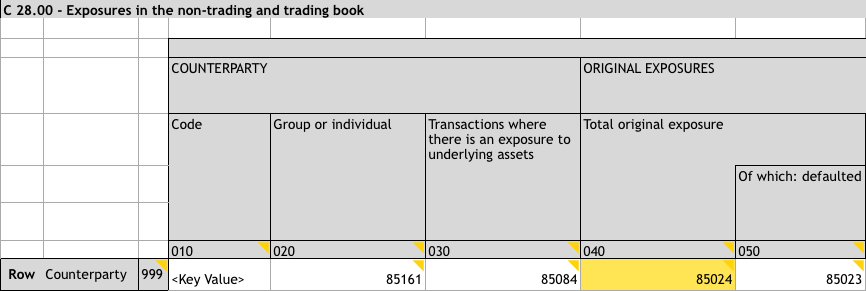
one data point in the Data Point Model is assigned to each COREP and
FINREP table cell; only grayed-out cells are not assigned a data
point. This is shown in the example below:
Data Point 85024 (highlighted in yellow) in template C 28.00 / LE 2
However, the data points cannot be directly read off in the XBRL
report, where they are transcribed more as dimensional members. Thus,
data point 85024 is defined as a four-dimensional member:
The dimensional coordinates of each individual data point are filed
under Fact and Context in the information reported in XBRL. This is
because the information in FINREP and COREP reports that was shown as
value in the cells and was described by means of row and column
entries is recorded in the XBRL report as Fact as part of a
Context. In XBRL, Facts cover the metric dimension member, a link to
context and the information reported, while Context covers the
reporting institutions, the reference date and the members of the
remaining dimensions.
The following XBRL extract describes data point 85024:
<!-- XBRL fact: metric dimension, link to XBRL context and value to be reported --><eba:mi180contextRef="c4"unitRef="U-EUR"decimals="-3">0</eba:mi180><!-- XBRL context: reporting institution, reference date and remaining dimensions --><xbrli:contextid="c4"><xbrli:entity><xbrli:identifierscheme="http://standards.iso.org/iso/17442:2012">LEIIDENTIFIERFORTEST</xbrli:identifier></xbrli:entity><xbrli:period><xbrli:instant>2013-12-31</xbrli:instant></xbrli:period><!-- XBRL scenario: covers remaining dimensions --><xbrli:scenario><xbrldi:explicitMemberdimension="eba_dim:BAS">eba_BA:x9</xbrldi:explicitMember><xbrldi:typedMemberdimension="eba_dim:INC"><eba_typ:CC>c</eba_typ:CC></xbrldi:typedMember><xbrldi:explicitMemberdimension="eba_dim:MCY">eba_MC:x59</xbrldi:explicitMember></xbrli:scenario></xbrli:context>
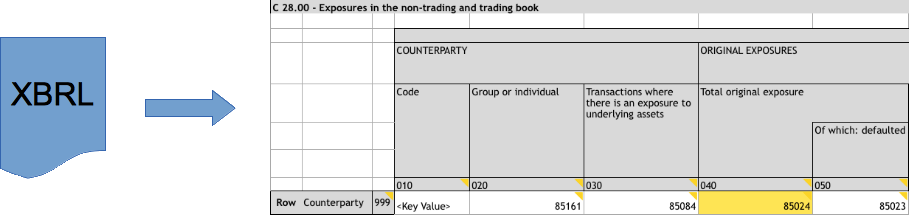
Simply technology: Application makes the conversion
The bridge there and back between the statutory supervisory reporting
in XBRL format and the usual view of the templates is therefore via the
DPM data points and their dimensional definition:
To bridge the format gap between the reports required by the banking
supervisory authority in XBRL file format and the forms that
departments are used to, a specialty application for reading XBRL for
COREP/FINREP is required.
]]>Dirk ZiegemeyerXBRL Reader: From COREP data point to template cell2014-10-28T00:00:00+01:002015-05-25T00:00:00+02:00https://ziegemeyer.com/products/xbrl-readerSince the reports for COREP and FINREP required by the banking
supervisory authority in XBRL format no longer contain table cells,
they cannot be read off directly.
ZIEGEMEYER Consulting has developed a solution as a bridge between
XBRL and the reporting template view that departments are used to.
As a result, reporting specialists are able to monitor the XBRL report
before their data is remitted to the Bundesbank [German Federal Bank]
in the usual way. It is therefore also possible to make comparisons
with previous reports – for example, to identify differences between
two reference dates or to carry out regression tests when replacing
versions of the reporting software.
XBRL Reader is a command line application. “xbrlread.exe” takes an
existing XBRL file as input, converts it to a table in csv format and
stores the csv in a new file.
XBRL Reader covers the Data Point Model (DPM) version 2.2.0 of
European Banking Authority (EBA) with all of it’s modules:
Common Reporting – Own Funds and Leverage (COREP)
Large Exposures (LE)
Liquidity Coverage (LCR)
Stable Funding (NSFR)
Financial Reporting (FINREP)
Funding Plans (FP)
Asset Encumbrance (AE)
Extensions to EBA XBRL made by national regulators are not in scope.
E.g. Deutsche Bundesbank added a header with contact name,
phone number, email address, etc. The software will note a warning for
each of these facts while all other EBA facts will still be converted
into table format:
Warning: Unknown XbrlFilingIndicatorCode 'header'.
Warning: Unknown XBRL Element bbk_met:si9.
Warning: Unknown XBRL Element bbk_met:si8.
Speed
XBRL Reader processes an XBRL file with a size of 2 MB – which is typical for a COREP
report – within two seconds.
An XBRL file of 20 MB will be processed in 15 seconds.
Current technical limitations
XBRL files must be utf-8 encoded. If your file is encoded differently,
you can change the encoding standard with a text editor.
Namespace prefixes of your XBRL file must correspond to the prefixes proposed
by EBA:
Dimensions: “eba_dim”
Domains: “eba_AP”, “eba_AS”, “eba_AT”, …
Metrics: “eba_met” or “eba”
Filing Indicators: “find”
XBRL instance: “xbrli”
If your XBRL file uses different namespaces, you can search/replace
them with the ones above in a text editor.
Release Notes
Version 1.1
Date: 2015-05-25
Fixes an error where XBRL could not be converted to csv when the special
characters “&”, “<” or “>” were included in the name of a large exposure borrower
in template C27.00/LE1 column 020.
Known Issues
There are some data points in Funding Plans that can’t be read at the
moment and will issue a warning instead. These are all the data points
in template P 02.06 - Structural Currency Mismatches. As well data
points with dimension “Residence of Counterparty = Country of the
reporting institution” are concerned, particularly all table rows for
“resident borrowers”:
P 01.01, rows 050, 060, 120, 130
P 01.02, rows 040, 080
P 02.07, rows 030, 040, 100, 110
P 02.08, rows 030, 070
The background of this bug is that XBRL Reader classifies each
dimension to be either a key dimension for an open axis or not to be a
key dimension. This turned out to be not true for 2 out of 114 dimensions.
Dimension “Currency of the exposure (CUE)” is not implemented as a key
dimension which will prevent data points from template P 02.06 to be
read.
Vice versa dimension “Residence of Counterparty (RCP)” is implemented
as key dimension which will cause the issues mentioned above where the
member of this dimension is the “Country of the reporting institution”.
If you need this issue to be fixed, please contact me.
Test data
There is a package with skeleton instances for DPM version 2.0
available on an
EBA webpage.
Choose the Large Exposure skeleton instance with file name
“corep_le_con.xbrl” from the zip file provided there. It can be processed with
XBRL Reader although there is one metric which will cause a warning because of a
change in the Data Point Model between version 2.0 and 2.2.
Redistribution and use in binary form, without modification, is
permitted provided that the following conditions are met:
Redistributions in binary form must reproduce the above copyright
notice, this list of conditions and the following disclaimer in the
documentation and/or other materials provided with the distribution.
THIS SOFTWARE IS PROVIDED BY THE COPYRIGHT HOLDERS AND CONTRIBUTORS
“AS IS” AND ANY EXPRESS OR IMPLIED WARRANTIES, INCLUDING, BUT NOT
LIMITED TO, THE IMPLIED WARRANTIES OF MERCHANTABILITY AND FITNESS FOR
A PARTICULAR PURPOSE ARE DISCLAIMED. IN NO EVENT SHALL THE COPYRIGHT
HOLDER OR CONTRIBUTORS BE LIABLE FOR ANY DIRECT, INDIRECT, INCIDENTAL,
SPECIAL, EXEMPLARY, OR CONSEQUENTIAL DAMAGES (INCLUDING, BUT NOT
LIMITED TO, PROCUREMENT OF SUBSTITUTE GOODS OR SERVICES; LOSS OF USE,
DATA, OR PROFITS; OR BUSINESS INTERRUPTION) HOWEVER CAUSED AND ON ANY
THEORY OF LIABILITY, WHETHER IN CONTRACT, STRICT LIABILITY, OR TORT
(INCLUDING NEGLIGENCE OR OTHERWISE) ARISING IN ANY WAY OUT OF THE USE
OF THIS SOFTWARE, EVEN IF ADVISED OF THE POSSIBILITY OF SUCH DAMAGE.
Open source software licenses
XBRL Reader uses the Mercury libraries
and runtime. See the file README in the installation package for
copying permissions and further information.